A table plan that starts with the guest.
Coordinate reservation requests, suitable tables, waiting guests and takeaway collections.
 Olive Table DemoIllustrative business
Start with the seating plan.
Match the party to suitable tables. Configure allowed table combinations and dining durations, with turnaround time before the next reservation.
- Choose location, date and arrival time.
- Give the guest count and preferred dining duration.
- Add seating requests only when needed.
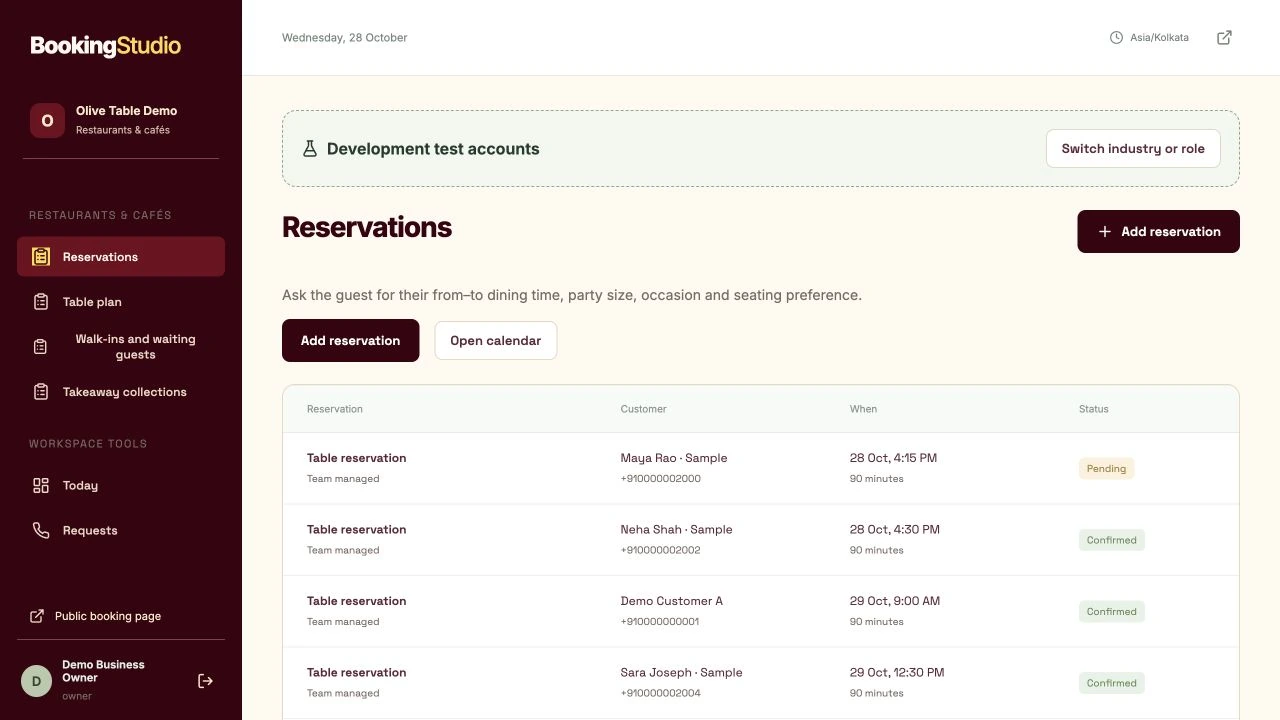
Actual Reservations screen with guest requests, dining durations and confirmation status.
A takeaway order is not a table reservation.
When takeaway products are published, customers can request items and quantities through a separate collection journey.
- Choose suitable tables and allowed combinations.
- Call the guest and confirm the reservation.
- Track arrivals, seating and finished visits.
Saturday dinner
- Party
- 4 guests
- Dining time
- 7:00–8:30 PM
- Seating
- Staff to confirm
See the customer’s side.
Then take the team’s seat.
Local sample data. Nothing is sent or booked.
Try a customer request.
This guided form is a local exercise. It does not submit a real request.
Table reservation
For demonstration only
Useful answers for restaurants & cafés.
Does this replace my POS?
No. It handles reservations and optional takeaway requests. Full POS and kitchen ordering are outside this release.
Can I combine tables?
Staff configure allowed combinations explicitly. Availability checks seating capacity and occupied times.
Make room for
your best work.
Your customers. Your team. One clearer day.
₹399/month · plus applicable taxes